
How to create a VietQR code to get paid, free and without an app
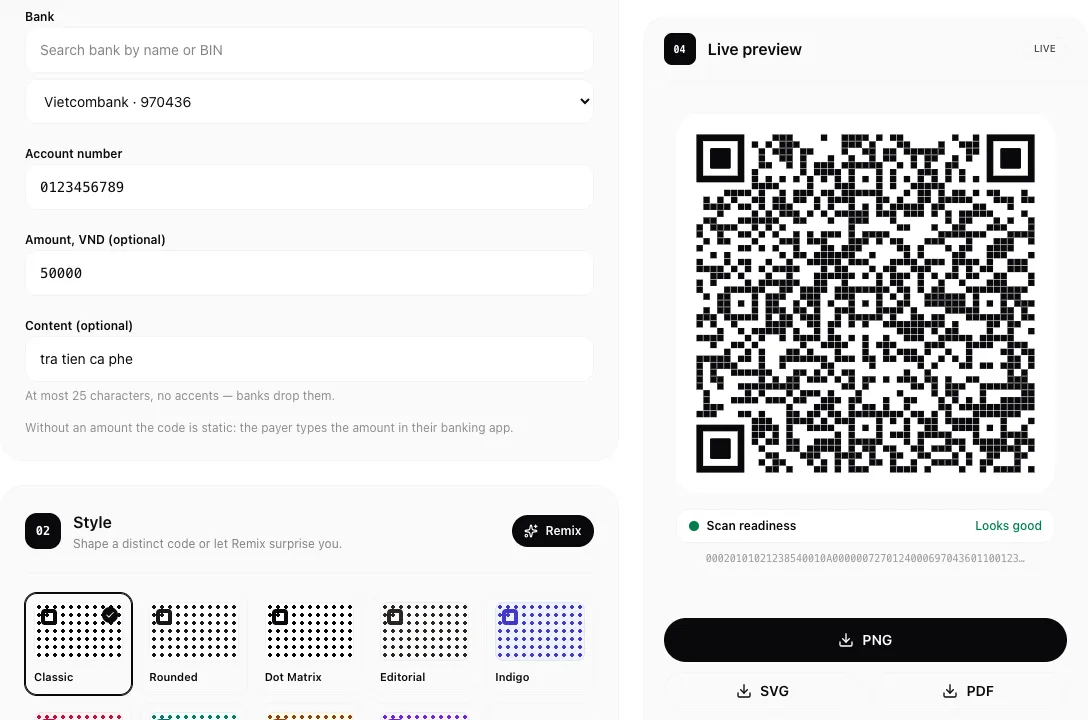
If you sell coffee, teach a class or split a dinner bill in Vietnam, people will ask: "Do you have a QR?" Most banking apps can show one, but only on your phone, and printing a clean copy for the counter is not always easy. You can make your own in a minute, for free, without installing anything.
What is VietQR?
VietQR is the common QR format for bank transfers in Vietnam, run by NAPAS and built on the EMVCo payment QR standard. A VietQR code holds your bank, your account number and, optionally, an amount and a transfer note. When someone scans it with their banking app, those fields are filled in for them.
Create a code in 4 steps
Open the VietQR generator on homielab.com.
- Pick your bank. Type its name or BIN in the search box, then choose it from the list.
- Enter your account number. Only digits, 6 to 19 of them. Export stays off until the number is valid.
- Add an amount and a note (optional). With an amount, the payer's app fills it in for them. Leave it empty for a code you can reuse for any amount, which is what a shop counter usually needs. The note holds up to 25 characters without accents, because banks drop them.
- Download it. Save it as PNG, SVG or PDF, or copy the image. The style section lets you change colours, add a logo and put a heading or caption around the code.
Print it for the counter
- Use a code without an amount for a counter or a tip jar: each customer types what they owe.
- Use a code with an amount and a note for one bill, such as an invoice or a class fee, so the payment is easy to recognise.
- SVG and PDF stay sharp at any size. Add a caption like your shop name so customers know the code is yours.
- Keep enough white space around the code and print it on matte paper; glare from a laminated sheet can make scanning harder.
Check it before you share it
The code is not issued or checked by a bank: it is built from what you type. Before you print it, scan it with your own banking app and make sure the account holder name it shows is yours. A single wrong digit sends money to someone else, or to nowhere.
The code is drawn in your browser. Your account number, amount and note are not sent to a server or saved, and nothing is kept after you close the page.
Already have a code?
If you have a VietQR from your banking app and only want a nicer printout, open it in the QR code reader, then choose "Create a similar code". The QR code generator opens with the bank, account number, amount and note already filled in, ready to restyle.
FAQ
Is it really free? Yes. There is no sign-up, no limit and no watermark.
Does the code expire? No. It only holds your bank details, amount and note, so it works until you close or change that account.
Which banking apps can scan it? Any banking app in Vietnam that supports VietQR. The generator lists the 76 banks and wallets in the NAPAS 247 network.
Will I get a notification when someone pays? That comes from your bank, as with any transfer. The code itself does not track payments.
Can I put Vietnamese accents in the note? No. Accents are removed, because banks drop them anyway. Write the note without accents to see exactly what the payer will get.
Related posts
- How to remove the GPS location from a photo before you share itPhone photos can carry the exact spot where they were taken. See whether yours does and download a clean copy without the location, right in your browser.
- How to make a contact QR code (vCard) for your business card, freeMake a vCard QR code in your browser: enter your name, phone, email and website, then print it on a business card so people save your contact with one scan.
- How to share your Wi-Fi with a QR code, without reading the password out loudMake a Wi-Fi QR code in your browser: enter the network name and password, pick the security type, then print it so guests join with one scan on iPhone or Android.